Send your client a timesheet they can confirm
Last updated
The short answer. Send the month's hours per day and per ticket, with the time you added by hand marked as such, in something your client can open without your tools: a CSV file, a PDF, a spreadsheet you share with them, or a link to a report page. Ask them to answer on it: a reply, a comment on the sheet or, on a hourslip report, a name typed on the page. That name is typed by whoever holds the link: “hourslip does not verify who confirms: anyone with the link can.”
Send it as a file or a shared sheet
- A CSV file. One row per day and ticket, with the hours and a note. Your client can open it in a spreadsheet; Google Sheets' import help (checked 2026-10-08): “You can import a spreadsheet in many file formats”, and
.csvis one of those it lists. - A PDF. Print the timesheet to a PDF and attach it. In Chrome, press Ctrl + p (⌘ + p on a Mac); Chrome's print help (checked 2026-10-08): “In the window that appears, select the destination and change your preferred print settings.” For saving to Google Drive it gives three ways: with the Save to Google Drive extension, choose “Save to Google Drive” as the destination; with Drive for desktop or the Drive website, click Save as PDF, then upload the PDF.
- A shared spreadsheet. Keep the timesheet in a sheet and share it with your client. Google Drive's sharing help (checked 2026-10-08): “you can control whether people can edit, comment on, or only open the file.” Share it as Commenter, one of its three roles with Viewer and Editor, and the client can answer on a cell: “Highlight the text, images, cells, slides, or scenes you want to comment on.” (comments help, checked 2026-10-08).
Whichever you send, the client's yes is whatever they write back: a reply to your email or a comment on the sheet. Keep it with the month's timesheet.
hourslip makes the CSV and the PDF on its free plan. /hourslip export acme writes the month's hourslip-acme-2026-10-days.csv and hourslip-acme-2026-10-tickets.csv (the current month, or the YYYY-MM you give), and with a client also hourslip-acme-2026-10-preview.html: the report page as a local file. Its footer says “Print this page to save it as PDF.”, and its preview banner is hidden when printed.
A report link with Confirm: hourslip
hourslip is a Claude Code mod (a plugin of function hooks) that keeps the timesheet while you work; how it counts and which hours it bills are in the first two guides. Its report link is the same report page, published, with a Confirm form at the bottom.
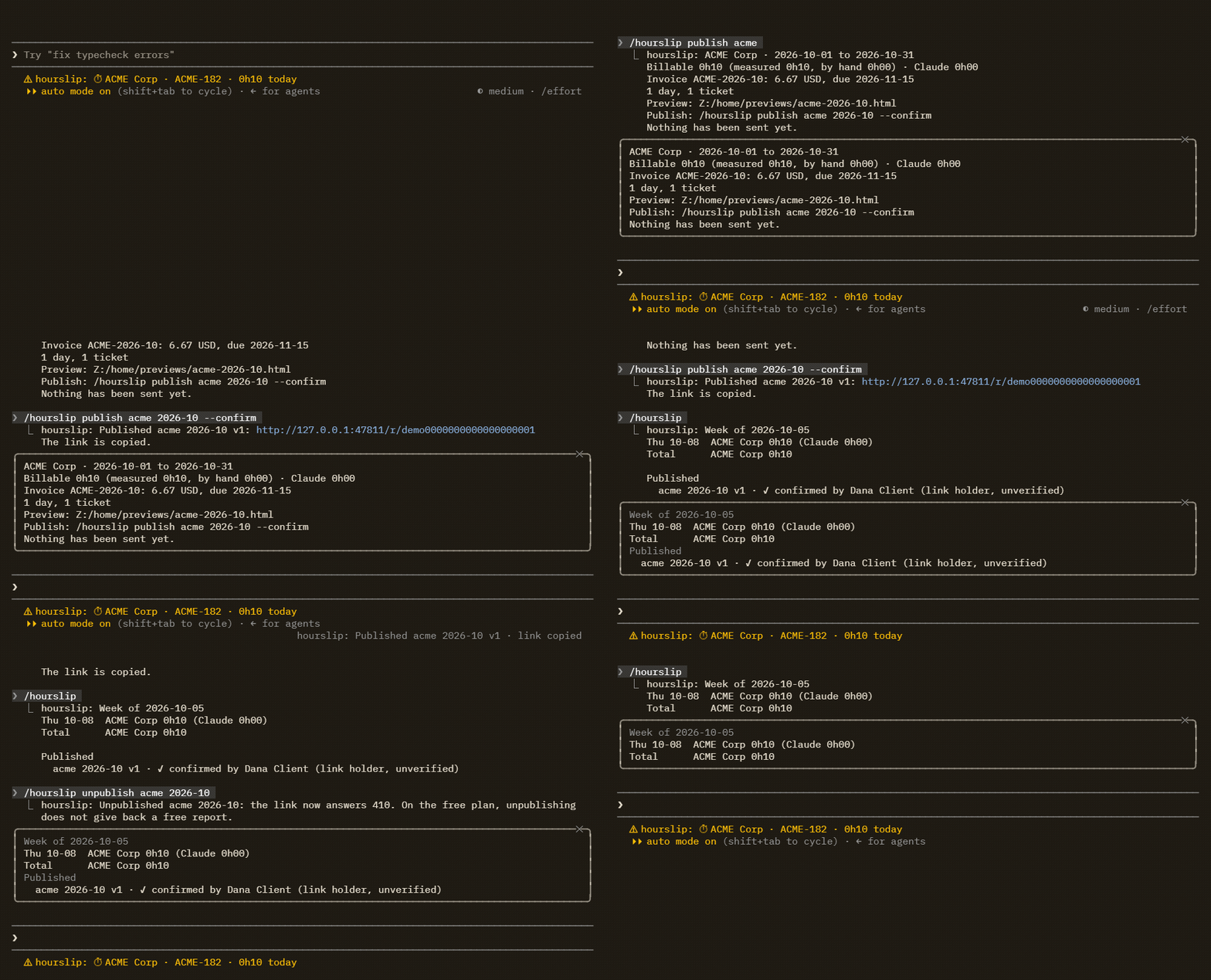
/hourslip publish acmeshows a summary of the month's report (the hours, the invoice if the client has a rate, the days and tickets) and writes a local preview. It ends with “Nothing has been sent yet.”/hourslip publish acme 2026-10 --confirmpublishes it. The reply is the link; in an interactive session it adds “The link is copied.” hourslip does not send it: you send it to your client, by email or however you like.- On the page, whoever holds the link can type a name and press Confirm these hours.
/hourslipasks the server about your reports not yet confirmed (up to 20), then lists them under Published:✓ confirmed by Dana Client (link holder, unverified), ornot confirmed.
What the client sees
Your client needs no account: “No. They open the link.” The page has the billable hours with the measured part, the part added by hand and the time Claude was working; the line “Measured from Claude Code activity. Time outside Claude Code, such as meetings or manual testing, appears only where it was added by hand, and is labelled so.”; the hours by day and by ticket; the time added by hand with your notes; the invoice, if the client has a rate; and the Confirm form.
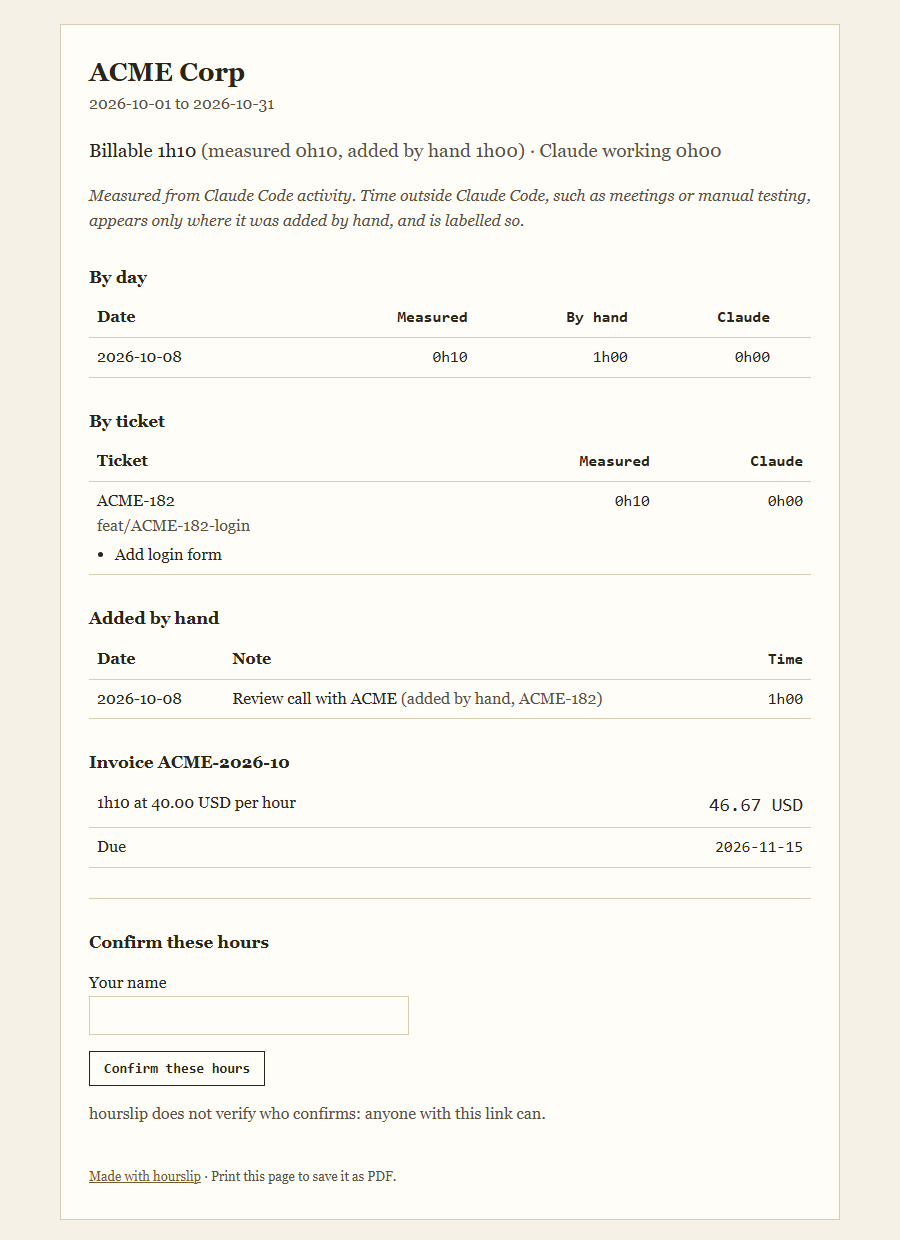
- The name is 1 to 100 characters. After it is sent the page reads, for the sample: “Confirmed by Dana Client (link holder) at 2026-10-07 18:06 UTC.” The server writes the time in UTC, as the line shows.
- Each version is confirmed once. A second try gets “This version was already confirmed. Nothing was changed.”
- The page says, under the form, “hourslip does not verify who confirms: anyone with this link can.” It records the name someone typed and when; whoever holds the link, including anyone it is forwarded to, can type any name.
- Printed from the browser, the page leaves out the Confirm button and the name field. It is marked
noindexfor search engines.
A new version, unpublishing, and free reports
Publishing the same client and month again makes a new version (v2, then v3), at a new link. The old link then shows “A newer version of this report exists.” with a link to the newest, and has no Confirm form. While the earlier version is still published, a new version does not count as another free report.
/hourslip unpublish acme 2026-10 deletes the report: every version of that client and month, and the name typed on each. The reply: Unpublished acme 2026-10: the link now answers 410. On the free plan, unpublishing does not give back a free report. Whoever opens the link then reads “This report is no longer available. It was removed by its author or reached the end of its two years.” The pane lists the report until you run /hourslip again.
The first two reports are free, no card (unpublishing one does not give it back). Without Pro, a third report (a new client or month, not a new version) is refused with “This key has used its 2 free reports. Run /hourslip subscribe to publish more. Links you already sent keep working.” Pro is $72 a year, or $8 billed monthly, and /hourslip subscribe opens its checkout page. A published report stays online for 2 years from publishing, and cancelling Pro only stops new publishes.
What hourslip does not do
- It checks no one. Your client has no account, and the name on the page is whatever was typed by whoever holds the link.
- A name, once typed, cannot be changed or withdrawn; the usage lists no command for it. Unpublishing deletes the report, with every name typed on it.
- It does not tell you when a name is typed. You see it when you run
/hourslip, which asks the server then. - Unpublish works on the machine that published: elsewhere it answers “No published report for acme 2026-10 on this machine.”
- One report per client and calendar month; there is no report for another span of days.
- After 2 years a published link answers 410, like an unpublished one.
- The report holds the time hourslip saw in Claude Code; time away from it is there only if you added it by hand with
/hourslip add.