A timesheet per ticket from git branch names
Last updated . Claude Code docs checked 2026-10-08.
The short answer. Put the ticket key in every branch name, as Jira and Linear both tell you to: feat/ACME-182-login for ticket ACME-182. Then the branch you were on says which ticket you worked on, and a timesheet per ticket is your working time grouped by that key. Note the branch with your times, or log the time on the ticket; or let a tool read the key from the branch while you work. Time on a branch with no key in its name has no ticket.
Put the ticket key in the branch name
Jira. The Jira docs on development work (checked 2026-10-08): “Include the work item key in the branch name when you create the branch to link it to your Jira work item.” Their example:
git checkout -b JRA-123-<branch-name>
“This works by default in connected Bitbucket, GitLab, GitHub, GitHub Enterprise, and Fisheye tools.” And: “If you’re using Bitbucket Cloud, GitHub or GitLab, you can create a branch directly from your Jira work item.” That is under Development, Create branch: “If you create a branch this way, the key is automatically added to the name of the branch.”
Linear. The Linear docs for GitHub (checked 2026-10-08): “Include issue ID in the branch name.” Their Copy git branch name action (Cmd/Ctrl + Shift + .) gives a name to paste, in the format chosen under Branch format (checked 2026-10-08). And: “If your branch name includes a Linear issue ID, Linear will automatically link the pull request to that issue.”
In Jira the key in the branch name links the branch to the work item; in Linear it links the pull request to the issue. It is also the key you want on each line of the timesheet.
A timesheet per ticket by hand
- Keep the branch in sight. Claude Code's status line can show it. The status line docs (checked 2026-10-08) have an example script that reads it with
BRANCH=$(git branch --show-current 2>/dev/null); git's--show-current(checked 2026-10-08) is documented as “Print the name of the current branch.” - Note the time per branch. When you switch branch, write down the time, or stop one timer and start the next. Add the time you spent on the ticket away from the editor: the call, the testing in a browser.
- Log it on the ticket. Jira's Log time on a work item (checked 2026-10-08): “Once you start work on a work item, log time to keep a record.” and “You can enter time estimates and log time in weeks (w), days (d), hours (h), and minutes (m).”
The timesheet is then one row per day and ticket with the hours. It is only as good as the notes: a switch you forget to write down puts the time on the wrong ticket.
The ticket read from the branch: hourslip
hourslip is a Claude Code mod (a plugin of function hooks). Each time you send a prompt and each time Claude's turn starts or ends, it records the folder and the git branch, read from .git/HEAD. The folder gives the client, from the paths you set; the ticket is the first match of a pattern in the branch name. The default pattern is [A-Z][A-Z0-9]+-T?\d+: a capital letter, then capitals or digits, a dash, an optional T, then digits. So:
feat/ACME-182-logingivesACME-182, andJRA-123-fix-logingivesJRA-123.fix-header-spacinggives no ticket.feat/acme-190-signupgives no ticket either: the pattern is matched as written, capitals and all.
The status line shows today's time for the client of the folder, with the ticket of the branch: ⏱ ACME Corp · ACME-182 · 0h10 today, or ⏱ ACME Corp · 0h10 today when the branch has none. It is redrawn when you send a prompt and when a turn starts or ends, and after each /hourslip command, so after a switch it changes at the next one:
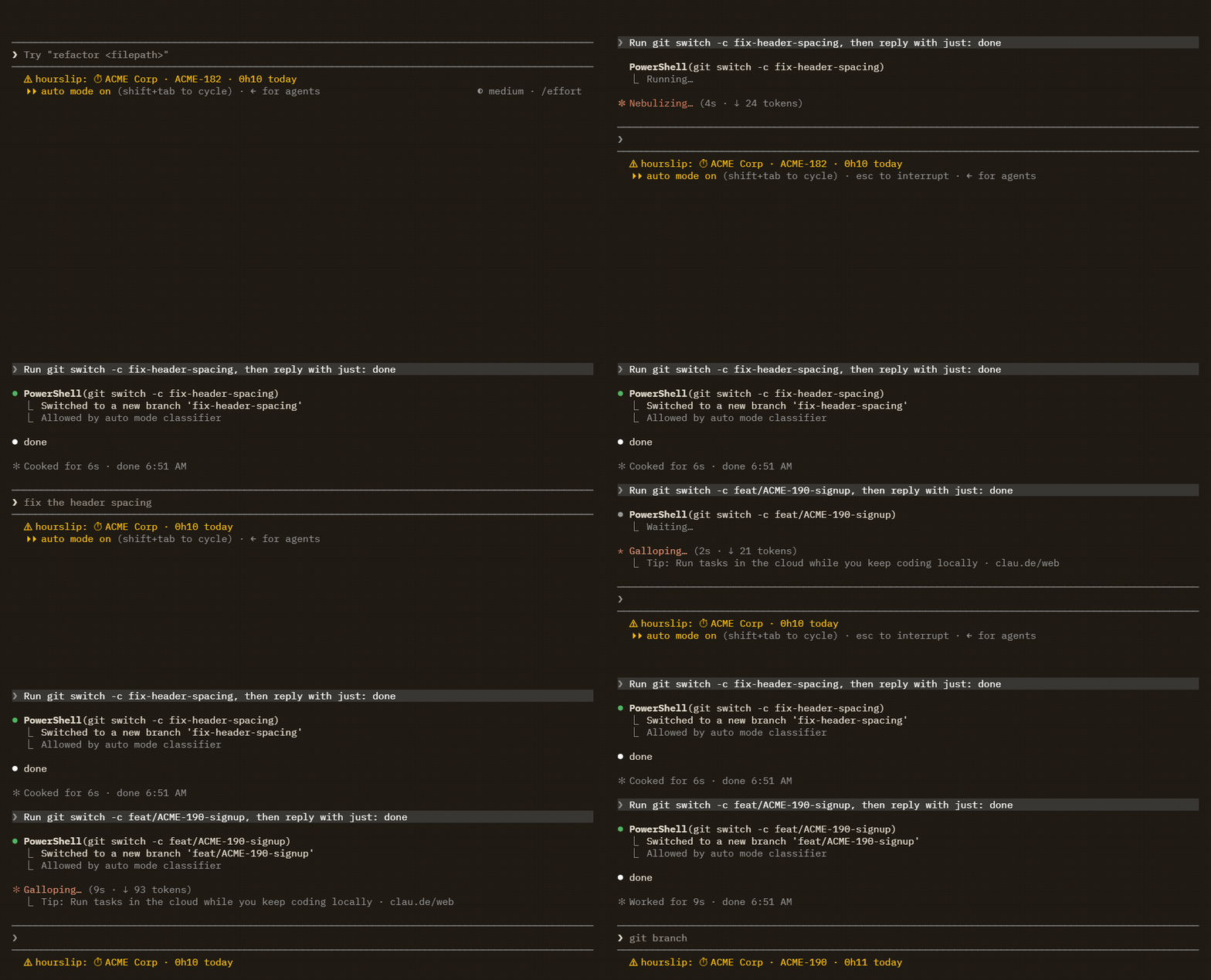
git switch -c; the status line changes when that turn ends.Time from one recorded moment to the next goes to the ticket of the first one. Two sessions on the same client at the same time count once, and that time is shared between their tickets.
No ticket in the branch name
The time still counts for the client. Reports list it as “No ticket” and the tickets CSV leaves the Ticket cell empty. To give the rest of a session a ticket, tag it:
/hourslip tag acme ACME-201
The reply was hourslip: Tagged this session from now: ACME Corp · ACME-201. (captured with claude -p in Claude Code 2.1.292, 2026-10-08). Add --session to tag the whole session, earlier time included. Time spent on a ticket away from Claude Code is added by hand with the ticket: /hourslip add 30m acme "Call about the signup" --ticket ACME-190.
Your own pattern
If your keys do not look like ACME-182, set "ticketPattern" in rules.json: at the top level for every client, or on one client in clients (its null means the top-level one). It is a JavaScript regular expression, and the ticket is the text it matches, as written in the branch. With "ticketPattern": "[a-z]+-[0-9]+" on the sample client, the branch feat/acme-190-signup read ⏱ ACME Corp · acme-190 · 0h41 today (captured with claude -p in Claude Code 2.1.292, 2026-10-08; the 0h41 includes 30 minutes added by hand on ACME-190 that day). Tickets are compared as text, so acme-190 and ACME-190 are two tickets. A pattern that is not valid is refused: /hourslip then says “Everything is Unassigned until it is fixed.” and shows the error.
The timesheet per ticket
/hourslip export acme writes the month's CSV files. The tickets file has one row per day and ticket; time added by hand is in Manual hours, with your note:
Date,Client,Ticket,Measured hours,Claude hours,Manual hours,Notes
2026-10-08,ACME Corp,ACME-182,0.08,0.00,0.00,
2026-10-08,ACME Corp,ACME-190,0.00,0.00,0.50,Call about the signup (added by hand)
2026-10-08,ACME Corp,,0.08,0.00,0.00,
Captured with claude -p in Claude Code 2.1.292 on Windows, 2026-10-08, with a sample client: one prompt each on feat/ACME-182-login, fix-header-spacing and feat/acme-190-signup, then 30 minutes added by hand on ACME-190. The file is shown whole except its byte-order mark. The three prompts ran seconds apart in three sessions, so their 10 minutes counted once and were shared: 0.08 hours to ACME-182, 0.08 to the two branches without a ticket.
The report (/hourslip export with a client, or /hourslip publish) has a By ticket table: each ticket with its branches and your commit titles from those branches, then the measured time and the time Claude was working; time added by hand is listed under Added by hand with its ticket. See a sample report.
What hourslip does not do
- It has no Jira or Linear connection: it logs no time on the ticket there and does not read your tickets. The key comes from the branch name, a tag or
/hourslip add --ticket; never from commit messages or pull request titles. - One ticket per moment: the first match in the branch name. A branch that names two tickets gives the first.
- The default pattern needs capitals. A branch named in lower case gives no ticket until you set a pattern for it.
- A tag wins over the branch for the rest of its session: after
/hourslip tag, switching branch no longer changes the ticket in that session. - There is no command to move measured time to another ticket afterwards. A tag works from now on (or for the whole session with
--session), and time away from Claude Code is added by hand. - A detached HEAD records the first 7 characters of the commit id as the branch, which the default pattern does not match: no ticket.
- Commit titles appear only when you run the commands in the Claude Code CLI; elsewhere, such as the desktop app, the preview and the command's reply say they are unavailable.
Related
- How to track time spent in Claude Code
- Bill clients for hours worked with Claude Code
- A sample hourslip report
- Reference work items in your development spaces, Jira Cloud docs (checked 2026-10-08)
- GitHub, Linear docs (checked 2026-10-08)
- All guides
- Install hourslip, free